Can AI assistants read your WordPress site?
A free plugin that checks, inside your WordPress admin, whether ChatGPT, Claude and other AI assistants can read your site, and fixes robots.txt and business details with one click you can undo. No account. Nothing is sent anywhere until you press a check button.
OOO Works – AI Visibility and Website Check, version 1.0.1, for WordPress 6.0 or later and PHP 7.4 or later. Free, GPLv2 or later.
Get it on WordPress.orgWhat the plugin does
Four free checks, under Tools › OOO Works:
- Can AI assistants read your site? Your robots.txt rules and what your server answers for each AI crawler: ChatGPT, Claude, Perplexity, Google AI Overviews, Copilot and Bing, Siri, Alexa, DuckDuckGo and Mistral. One line per assistant (OK, blocked, or can't tell), with the fix. It also tells you where your robots.txt comes from: a real file on the server, WordPress's own virtual robots.txt, or your SEO plugin.
- Website check. A score out of 100 for the basics customers and search engines look for (secure connection, phones, contact details, page titles, business details), each with a plain-word fix. The same check as OOO Check.
- Search result and link preview. How your home page may look in Google and when someone shares a link, with fixes.
- Sitemap. Finds your sitemap (WordPress's
/wp-sitemap.xmlor your SEO plugin's), checks it, and opens up to 20 listed pages for errors, redirects, noindex and canonical tags pointing elsewhere.
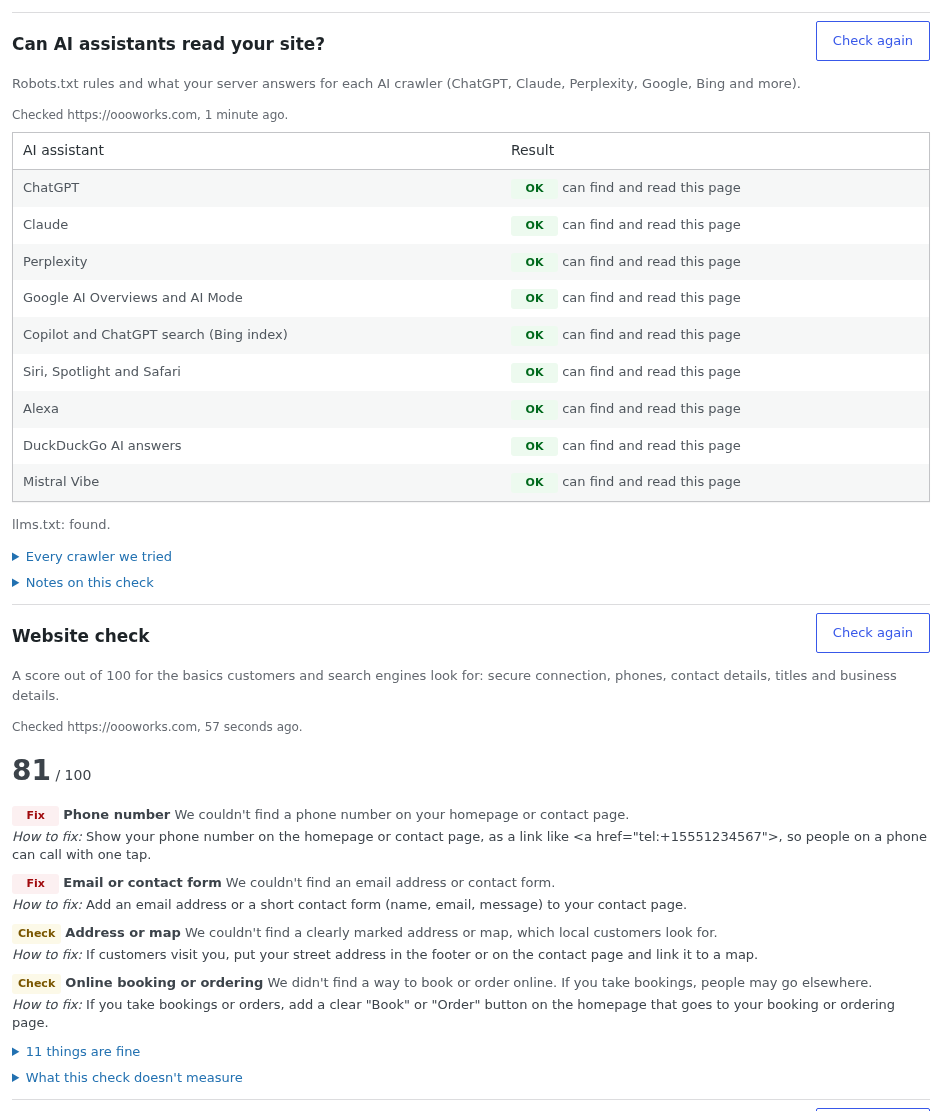
Two fixes it can make for you
Both are off until you turn them on, show you exactly what they'll do first, and come with one-click Undo.
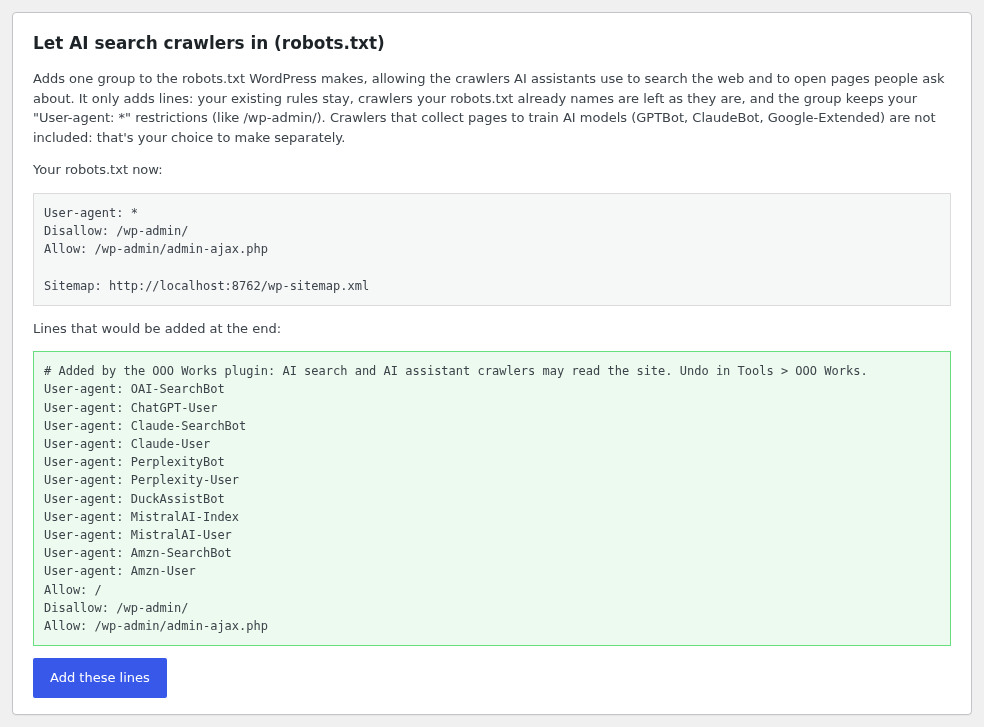
- Let AI search crawlers in. Adds one group to the robots.txt WordPress makes, allowing the crawlers AI assistants use to search and to open pages people ask about (OAI-SearchBot, ChatGPT-User, Claude-SearchBot, Claude-User, PerplexityBot, Perplexity-User and others). It only adds lines: it never removes a rule, leaves alone any crawler your robots.txt already names, and keeps your
User-agent: *restrictions. AI training crawlers (GPTBot, ClaudeBot, Google-Extended) are not included; that's your choice. - Business details for search engines and AI. A short form (name, type of business, address, phone, opening hours, services, area, profiles) that adds LocalBusiness structured data to your home page, the same as our free business schema generator. If Yoast SEO, Rank Math, All in One SEO, SEOPress, The SEO Framework or Slim SEO is active, it doesn't add a second description of your business; it tells you to fill in your details there.
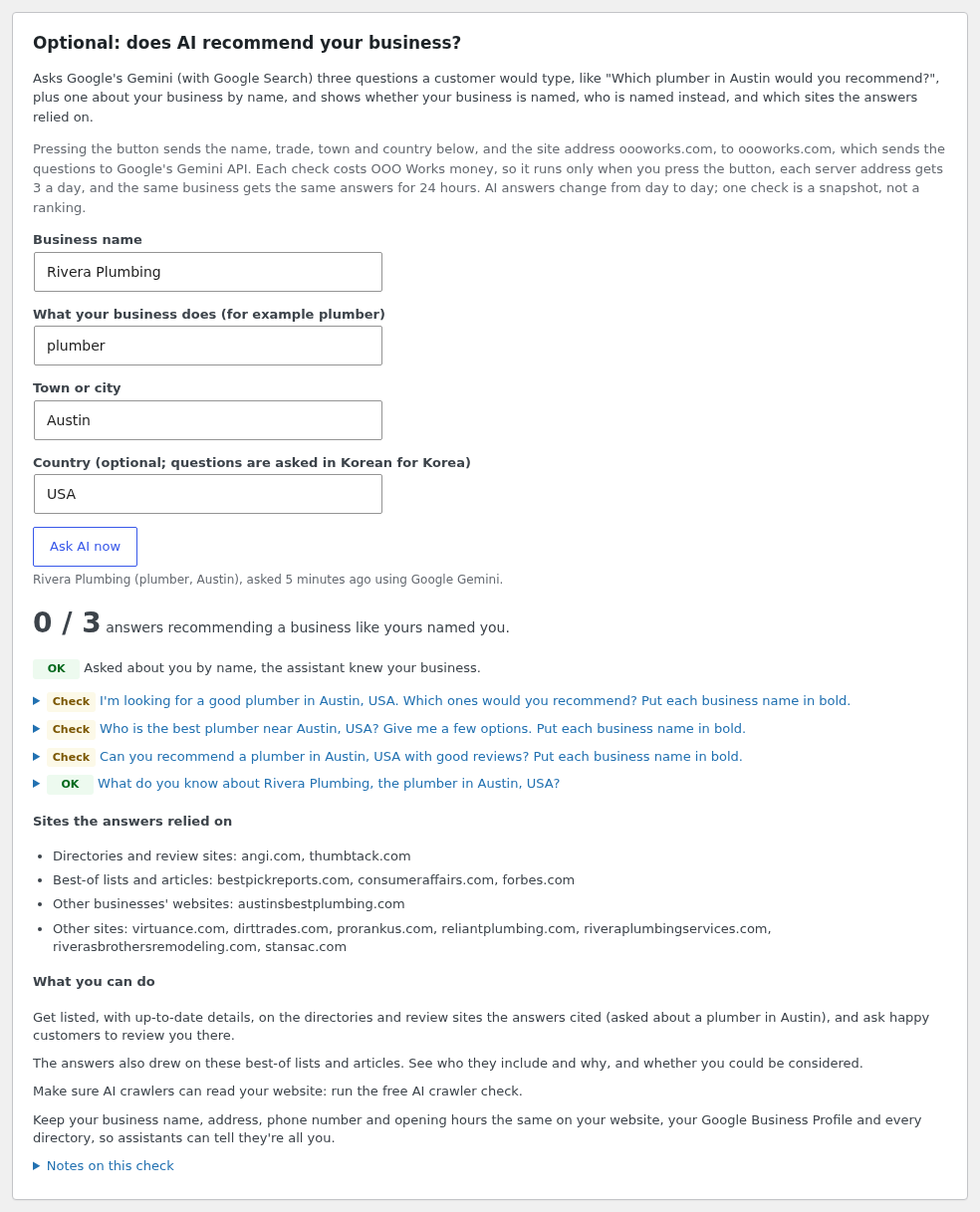
Optional: does AI recommend your business?
Enter your business name, trade and town, press "Ask AI now", and the plugin shows whether Google's Gemini (with Google Search) names your business when asked three questions a customer would type, who it names instead, and which sites the answers relied on. It runs only when you press the button. It works like our AI answer check.
Optional weekly check
Off by default. When you switch it on, the four free checks run once a week and the page shows what changed since the check before.
How to install it
- In your WordPress admin, open Plugins › Add New, search for "OOO Works", then install and activate it. Or download the zip from WordPress.org and upload it.
- Open Tools › OOO Works.
- Press Run all four checks. If your site isn't public yet (staging or local), enter your public address under "Site to check" first: the checks open your site from the internet, like a visitor.
Questions
Is ChatGPT allowed to crawl my WordPress site?
Usually yes. The robots.txt WordPress makes on its own only keeps crawlers out of /wp-admin/. ChatGPT can be shut out by a robots.txt file on your server, an SEO plugin's robots.txt rules, the "Discourage search engines" setting under Settings › Reading, or a firewall or CDN that blocks AI crawlers. The plugin's first check shows which of these applies, crawler by crawler. If you'd rather not install anything, the AI crawler check does the same from your browser.
Will the robots.txt fix change my existing rules?
No. It only adds a group for AI search crawlers your robots.txt doesn't already name, after showing you the exact lines, and Undo removes them. It doesn't edit a robots.txt file on your server. If your site has a real robots.txt file, an SEO plugin with its own robots.txt editor (Rank Math, All in One SEO, SEOPress), is installed in a sub-folder, or asks search engines not to index it, the plugin explains what to do instead of adding anything.
Does it let AI companies train on my site?
No. The fix allows only the crawlers AI assistants use to search and to open pages people ask about. AI training crawlers (GPTBot, ClaudeBot, Google-Extended) are not included. Blocking or allowing those is a separate choice; the AI robots.txt generator shows each one.
Why didn't the plugin add my business details?
Your SEO plugin already describes your site or business in its structured data, and two separate descriptions confuse search engines. Fill in your business details in your SEO plugin instead.
The check says it couldn't open my site
The checks run from the internet. A local or staging site, a site behind a password or "coming soon" page, or a firewall that blocks unknown visitors can't be checked. Enter your public address under "Site to check".
It says I've used my checks for now
The checks are free and limited per server address: 30 checks an hour, and 3 AI answer checks a day. On shared hosting, many websites share one address, so others may have used the limit. Wait a little and try again; results already shown stay on the page.
Is it free? Do I need an account?
Yes, it's free, and no, you don't need an account. Every feature works without an account or payment. Nothing is for sale.
Can AI answers be guaranteed?
No. Nobody controls what an AI assistant says. The AI answer check measures what one assistant said at one moment; answers change from day to day.
What it sends, and what it keeps
The plugin adds nothing to your visitors' pages except the business details you choose to add: no cookies, tracking, analytics or ads. Results stay in your WordPress database and are removed when you delete the plugin. When you press a check button, it sends the address of the site to check to oooworks.com; the AI answer check also sends the business name, trade, town and country you typed, and our server asks Google's Gemini API. Details are in our privacy policy.
Who made this
OOO Works, which is building done-for-you services for small businesses worldwide, including OOO Visibility: it tracks whether AI assistants name a business for the questions its customers ask, and fixes what keeps it out. OOO Works is opening soon; nothing is on sale yet. About OOO Works.